
The Channel Content API allows you to retrieve comprehensive information about YouTube channels, including channel details, videos, shorts, playlists, and outlier analysis. Access channel metadata, video lists with various sorting options, short-form content, playlist collections, and high-performing video identification in your n8n workflows.
Overview
Use this API to fetch detailed channel information, video lists, shorts, playlists, and outlier videos from any YouTube channel. This resource provides five main operations: Get About (channel metadata), Get Videos (long-form content), Get Shorts (short-form content), Get Playlists (playlist collections), and Get Outliers (high-performing video identification), with flexible sorting and filtering options.
Quick Start
Get started in 3 simple steps:
- Install NexLev: Add the NexLev node to your n8n instance (Installation Guide)
- Get API Key: Create your API key at API Key
- Make Your First Request:
- Add NexLev node → Select "Channel Content" → Choose "Get About"
- Enter a Channel ID (e.g.,
UCBJycsmduvYEL83R_U4JriQ) - Execute to get channel information
Example Result: You'll receive channel metadata including title, description, subscriber count, and social links.
Endpoint Details
- Resource: Channel Content
- Operations: Get About | Get Videos | Get Shorts | Get Playlists | Get Outliers | Custom API Call
- Authentication: Required (API Key)
- Quota Cost: 🥞 1 quota per request (all operations)
API Reference
| Operation | Method & Path | Quota Cost |
|---|---|---|
| Get About | GET /api/external/channels/about | 🥞 1 |
| Get Videos | GET /api/external/channels/videos | 🥞 1 |
| Get Shorts | GET /api/external/channels/shorts | 🥞 1 |
| Get Playlists | GET /api/external/channels/playlists | 🥞 1 |
| Get Outliers | GET /api/external/channels/outliers | 🥞 1 |
Operations Quick Reference
| Operation | Purpose | Pagination | Sorting | Returns | Best For | Quota Cost |
|---|---|---|---|---|---|---|
| Get About | Retrieve channel metadata and information | ❌ No | ❌ No | Single object | Channel research, profile building | 🥞 1 |
| Get Videos | Get all long-form videos from a channel | ✅ Yes | ✅ Yes | Array + meta | Content analysis, database building | 🥞 1 |
| Get Shorts | Get all short-form videos from a channel | ✅ Yes | ✅ Yes | Array + meta | Shorts performance tracking | 🥞 1 |
| Get Playlists | Get all playlists from a channel | ✅ Yes | ✅ Yes | Array + meta | Content organization analysis | 🥞 1 |
| Get Outliers | Identify high-performing videos | ❌ No | ❌ No | Array + stats | Viral content discovery | 🥞 1 |
Configuration
Parameters
| Parameter | Type | Required | Description |
|---|---|---|---|
| Channel ID | string | Yes | The unique YouTube channel identifier (e.g., UC9XrHBgOxsNFEBXkLtEqCwA) |
Setup Steps
Step 1: Add NexLev Node
- Add the NexLev node to your workflow
- See Quickstart Guide for installation instructions
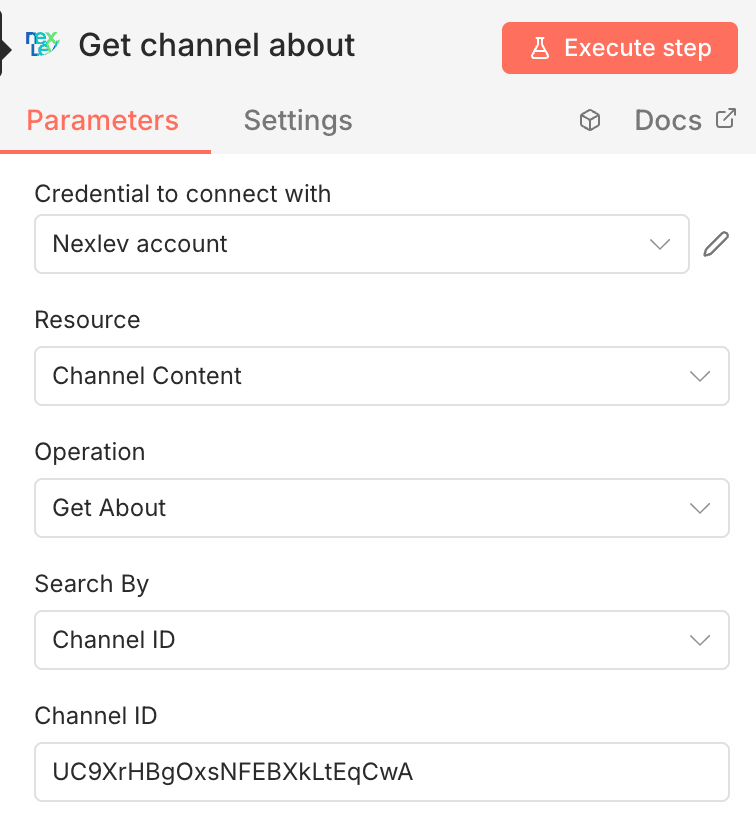
Step 2: Configure Resource
- Under Resource, select Channel Content
Step 3: Select Operation Choose one of the following operations:
| Operation | Description | Pagination Required |
|---|---|---|
| Get About | Get channel metadata and information | ❌ No |
| Get Videos | Get all videos from a channel | ✅ Yes (for complete data) |
| Get Shorts | Get all short-form videos from a channel | ✅ Yes (for complete data) |
| Get Playlists | Get all playlists from a channel | ✅ Yes (for complete data) |
| Get Outliers | Get videos with significantly higher views than average | ❌ No |
| Custom API Call | Make custom API calls | Varies |
Step 4: Authentication
- Under Credential to connect with, select your NexLev account
- If not configured, create one using your API Key
Step 5: Enter Channel ID ✅ Required
- In the Channel ID field, enter the YouTube channel ID (e.g.,
UCBJycsmduvYEL83R_U4JriQ) - Channel IDs typically start with "UC" followed by 22 characters
Step 6: Configure Optional Parameters
For Get Videos, Get Shorts, and Get Playlists:
- Sort By (optional):
Latest- Newest first (default for videos/shorts)Popular- Most viewed first (videos/shorts only)Oldest- Oldest first (videos/shorts only)Date Added- Newest playlists first (playlists only)Last Video Added- Recently updated playlists (playlists only)
For Pagination (Get Videos, Get Shorts, Get Playlists):
- Leave Continuation Token empty for the first request
- Use the
continuationtoken from previous response for subsequent pages - Continue until
continuationreturns an empty string
For Get Outliers:
- Maximum Videos (default: 30) - Number of recent videos to analyze
- ⚠️ Higher values increase processing time
- ✅ Recommended: 30-50 for most channels
- Minimum Outlier Threshold (default: 2) - Multiplier for outlier detection
- ⚠️ Lower values return more results but less exceptional content
- ✅ Recommended: 2x for viral content, 1.5x for above-average content
Execution
Click Execute step to retrieve the channel content data.
Available Operations
The Channel Content resource provides five different operations to retrieve various types of channel data:
Get About
Get detailed information about a YouTube channel including description, avatar, banner, channel handle, and subscriber information.
When to use this operation:
- Gathering channel profile information for research
- Building channel databases with metadata
- Extracting social media links and contact information
- Verifying channel authenticity and statistics
Get Videos
Get all videos from a YouTube channel with detailed metadata including view count, publish date, thumbnails, and more. Supports pagination via continuation tokens to retrieve additional videos beyond the initial response.
When to use this operation:
- Analyzing video performance and publishing patterns
- Building comprehensive video databases
- Tracking content output over time
- Identifying content trends and topics
Get Shorts
Get all short-form videos (YouTube Shorts) from a YouTube channel with metadata. Supports pagination via continuation tokens to retrieve additional shorts beyond the initial response.
When to use this operation:
- Tracking short-form content performance separately
- Analyzing shorts strategy and engagement
- Comparing shorts vs long-form video performance
- Building shorts-specific databases
Get Playlists
Get all playlists from a YouTube channel with detailed metadata including video count and thumbnails. Supports pagination via continuation tokens to retrieve additional playlists beyond the initial response.
When to use this operation:
- Analyzing how channels organize their content
- Discovering content series and collections
- Tracking playlist updates and additions
- Building playlist databases for content curation
Get Outliers
Get videos from a YouTube channel that have significantly higher views than the channel's average video performance. This operation analyzes recent videos to identify outlier content that performed exceptionally well, helping you discover what content resonates most with the audience.
When to use this operation:
- Identifying viral or exceptionally successful content
- Understanding what content types resonate with audiences
- Analyzing patterns in high-performing videos
- Making data-driven content strategy decisions
- Finding inspiration for future content topics
Error Responses
Use Cases
Leverage channel content data in your workflows for:
- Channel Research: Gather detailed information about channels in your niche including bio, avatar, and statistics
- Video Analysis: Analyze video performance, publishing patterns, and engagement metrics
- Content Strategy: Study successful channels' video titles, descriptions, and publishing frequency
- Competitor Intelligence: Monitor competitor content output and performance over time
- Outlier Discovery: Identify exceptionally high-performing videos to understand what content resonates most
- Database Building: Create comprehensive databases of channels, videos, shorts, and playlists with full metadata
- Shorts Performance: Track and analyze short-form content performance separately from long-form videos
- Playlist Organization: Analyze how channels organize their content into playlists for better content structure insights
- Content Curation: Discover and monitor playlists in your niche for content inspiration and collaboration opportunities
- Link Harvesting: Extract social media and website links from channels for outreach campaigns
- Trend Analysis: Identify content trends by analyzing video titles, thumbnails, and view counts across videos and playlists
Workflow Examples
These examples show how to implement common use cases in n8n. Each workflow builds on the previous concepts, starting with simple queries and progressing to advanced implementations.
Example 1: Basic Channel Information Workflow
Difficulty: Beginner | Time: 5 minutes | Use Case: Channel research
- Add a Manual Trigger or Schedule Trigger node
- Add the NexLev node and configure it for Get About operation
- Add a Code or Set node to extract specific fields (e.g., channel handle, subscriber count)
- Add an output node (e.g., Google Sheets, Airtable, Webhook)
Next Steps: Once you have channel information, try fetching videos or analyzing outliers.
Example 2: Video Collection with Sorting
Difficulty: Beginner | Time: 5 minutes | Use Case: Content analysis
- Add a Manual Trigger node with a channel ID
- Add the NexLev node:
- Resource: Channel Content
- Operation: Get Videos
- Sort By: Popular (to get most viewed videos first)
- Add a Filter node to select videos meeting specific criteria (e.g., view count > 10,000)
- Export results to Google Sheets or send via Email
Next Steps: Learn pagination to fetch complete datasets.
Example 3: Video Pagination Workflow (Fetching All Videos)
Difficulty: Intermediate | Time: 15 minutes | Use Case: Complete data collection
- Add a Manual Trigger node
- Add the NexLev node (first request):
- Resource: Channel Content
- Operation: Get Videos
- Channel ID: Enter the channel ID
- Sort By: Latest (or your preferred sort order)
- Leave Continuation Token empty
- Add a Loop Over Items node to handle pagination:
- Extract the
continuationtoken from the response - If the token is not empty, loop back to another NexLev node
- Extract the
- Add a second NexLev node (inside the loop):
- Use the same configuration as step 2
- Set Continuation Token to the value from the previous response (
{{ $json.continuation }})
- Add a Code node to aggregate all videos from multiple pages
- Export the complete video collection to your desired destination
Next Steps: Apply the same pagination pattern to shorts and playlists.
Example 4: Shorts Pagination Workflow (Fetching All Shorts)
Difficulty: Intermediate | Time: 15 minutes | Use Case: Shorts analysis
- Add a Manual Trigger node
- Add the NexLev node (first request):
- Resource: Channel Content
- Operation: Get Shorts
- Channel ID: Enter the channel ID
- Sort By: Popular (or your preferred sort order)
- Leave Continuation Token empty
- Add a Loop Over Items node to handle pagination:
- Extract the
continuationtoken from the response - If the token is not empty, loop back to another NexLev node
- Extract the
- Add a second NexLev node (inside the loop):
- Use the same configuration as step 2
- Set Continuation Token to the value from the previous response (
{{ $json.continuation }})
- Add a Code node to aggregate all shorts from multiple pages
- Process or export the complete shorts collection as needed
Example 5: Playlist Analysis Workflow
Difficulty: Beginner | Time: 10 minutes | Use Case: Content organization research
- Add a Manual Trigger or Schedule Trigger node
- Add the NexLev node:
- Resource: Channel Content
- Operation: Get Playlists
- Sort By: Last Video Added (to see most recently updated playlists)
- Add a Code node to extract specific fields (e.g., playlist title, video count, last updated date)
- Add a Filter node to select playlists with specific criteria (e.g., video count > 10)
- Export results to Google Sheets or Notion for content planning
Example 6: Playlist Pagination Workflow (Fetching All Playlists)
Difficulty: Intermediate | Time: 15 minutes | Use Case: Complete playlist collection
- Add a Manual Trigger node
- Add the NexLev node (first request):
- Resource: Channel Content
- Operation: Get Playlists
- Channel ID: Enter the channel ID
- Leave Continuation Token empty
- Add a Loop Over Items node to handle pagination:
- Extract the
continuationtoken from the response - If the token is not empty, loop back to another NexLev node
- Extract the
- Add a second NexLev node (inside the loop):
- Use the same configuration as step 2
- Set Continuation Token to the value from the previous response (
{{ $json.continuation }})
- Add a Code node to aggregate all playlists from multiple pages
- Export the complete playlist collection to your desired destination
Example 7: Outlier Analysis Workflow
Difficulty: Beginner | Time: 10 minutes | Use Case: Viral content discovery
- Add a Manual Trigger or Schedule Trigger node
- Add the NexLev node:
- Resource: Channel Content
- Operation: Get Outliers
- Channel ID: Enter the channel ID
- Maximum Videos: 30 (or higher for more comprehensive analysis)
- Minimum Outlier Threshold: 2 (adjust based on your needs)
- Add a Code node to extract specific fields (e.g., video title, outlier score, publish date)
- Add a Filter node if you want to further refine results (e.g., outlier score > 3x)
- Export results to Google Sheets or Notion for content strategy planning
Tip: If no outliers are found, the workflow can automatically retry with adjusted parameters (lower threshold or more videos).
Next Steps: Combine multiple operations to build comprehensive channel analysis workflows.
Example 8: Advanced - Complete Channel Analysis
Difficulty: Advanced | Time: 30 minutes | Use Case: Comprehensive channel research
This workflow combines multiple operations to create a complete channel analysis:
- Get Channel Info: Use Get About to fetch channel metadata
- Get Top Videos: Use Get Videos with Sort By "Popular" to get top 10 videos
- Get Outliers: Use Get Outliers to identify viral content
- Get Playlists: Use Get Playlists to understand content organization
- Aggregate Data: Use Code node to combine all data into a comprehensive report
- Export: Send to Google Sheets, Notion, or your database
Benefits: Complete channel profile with performance insights in one workflow execution.
Related Resources
- Quickstart Guide - Learn how to set up NexLev with n8n
- Channel Analytics - Get detailed analytics data for channels
- Video Content - Analyze individual video performance
- Analyze Channel Niche - Get comprehensive niche analysis
Best Practices
Performance Optimization
- Use pagination wisely: Fetch only the data you need. Don't retrieve all videos if you only need recent ones
- Cache channel metadata: Get About responses change infrequently, consider caching for 24 hours
- Batch operations: Process multiple channels in parallel using n8n's batch processing capabilities
- Monitor quota usage: Each request costs 🥞 1 quota — paginated requests each count separately, so cache responses and avoid redundant calls
Common Mistakes to Avoid
❌ Don't: Fetch all videos when you only need recent ones ✅ Do: Use Sort By "Latest" and limit results with continuation tokens
❌ Don't: Make repeated Get About calls for the same channel ✅ Do: Cache channel metadata and refresh periodically
❌ Don't: Use Get Outliers with Maximum Videos set to 1000+ ✅ Do: Start with 30-50 videos and increase if needed
❌ Don't: Ignore pagination tokens ✅ Do: Implement proper pagination loops to get complete data
Rate Limiting
- The API enforces rate limits to ensure fair usage
- If you receive a
429 Too Many Requestserror, wait for the time specified inretryAfter - Consider implementing exponential backoff for production workflows
- Distribute large batch operations over time to avoid rate limits
Troubleshooting
No outliers found
Problem: The Get Outliers operation returns an empty array.
Solutions:
- Increase Maximum Videos to analyze more content (try 50 or 100)
- Decrease Minimum Outlier Threshold (try 1.5x instead of 2x)
- Check if the channel has consistent view counts (some channels naturally have few outliers)
Pagination not working
Problem: Continuation token returns the same results.
Solutions:
- Ensure you're passing the exact token from the previous response
- Don't modify or encode the continuation token
- Keep all other parameters (Channel ID, Sort By) the same between requests
- Check if you've reached the last page (empty continuation string)
Channel not found (404 error)
Problem: API returns "Channel not found" error.
Solutions:
- Verify the Channel ID is correct (should start with "UC")
- Check if the channel still exists on YouTube
- Ensure the channel is not private or terminated
- Try using the channel handle to find the correct Channel ID
Invalid API key (401 error)
Problem: Authentication fails with "Unauthorized" error.
Solutions:
- Verify your API key is correct and active
- Check if your API key has the necessary permissions
- Ensure you've properly configured the NexLev credential in n8n
- Generate a new API key if the current one is expired
Support
If you encounter issues or have questions about the Channel Content API, please contact our support team at contact@nexlev.io or refer to our troubleshooting guide.